
Concepts and Workflow
Neko Translator splits comic translation into four independent steps. Each step has its own input, output, and model capability.
The automated comic translation workflow
Section titled “The automated comic translation workflow”The complete automated workflow is usually:
Detect Text Block → Extract Text → Extract Image Summary → Translate| Step | Purpose | Main input | Main output |
|---|---|---|---|
| Detect Text Block | Find speech bubbles and other text regions | Comic image | Text-block positions; some models also return source text |
| Extract Text | Read the source text inside existing boxes | Comic image and text blocks | Source text |
| Extract Image Summary | Describe the image for translation context | Comic image | Image description |
| Translate | Generate translated text using source text and context | Source text, context, glossary | Translation text |
Detect Text Block and extract text are different operations. Detection only determines “where the text is”. Extract Text determines “what the text says”.
Model capabilities differ. For example, PaddleOCR VL 1.6 and GLM-OCR can extract text while detecting text-block positions, while the local text block detector detects positions only.
Splitting the workflow into steps allows a person to intervene or redo only part of the process, and lets different members collaborate on the same manga.
- Extract Text needs existing text blocks. Text blocks may come from a text-block detection model or be marked manually.
- Translate needs source text. The source text may come from a text extraction model or manual input.
- Extract Image Summary can run independently.
- Translate may use the image summary result as context, but does not require it.
Model capabilities
Section titled “Model capabilities”Generic AI:
Each model in a Generic AI configuration can declare the capabilities it provides:
- Extract Text requires vision input. The model reads the text-block region.
- Extract Image Summary requires vision input. The model reads the full page image.
- Translate requires language generation.
Detect Text Block:
Detect Text Block requires a specially integrated detector. The supported options are the local text block detector, PaddleOCR VL 1.6, and GLM-OCR. Generic AI models are not accurate enough at this task, so this capability is not supported for them for now.
More dedicated integrations may be added later, such as extract text and image restoration models.
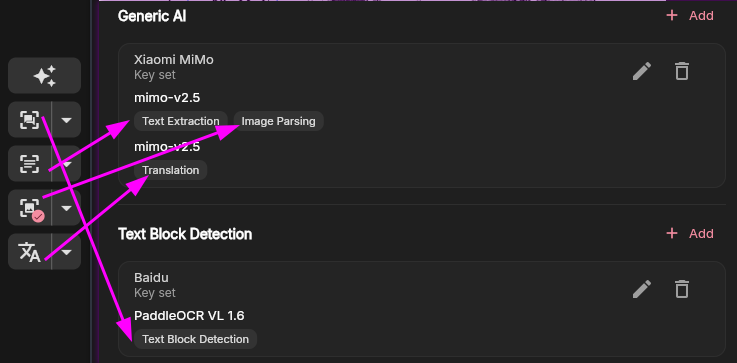
These model capabilities configured in Service Profile correspond to the automation buttons in the comic editor:
Existing results and overwrites
Section titled “Existing results and overwrites”When running a step separately, you can usually choose to process only missing results or all objects again. Reprocessing everything may overwrite existing results, including manually edited source text or translations. Check the scope before starting batch processing.
What an automation operation sends externally
Section titled “What an automation operation sends externally”The data sent to third-party services depends on the step:
- Detect Text Block usually sends the full page image.
- The local text block detector works offline and sends nothing externally.
- Extract Text sends a text-block crop or the full page, depending on the provider.
- Extract Image Summary sends the full page image.
- Translate mainly sends text, context, and glossary entries.
See Frequently Asked Questions for storage and privacy details.